

 español
 inglés
 Basic — Licencia básica requerida
NX::Backup Guard
NX::Backup Guard is a professional WordPress backup & restore suite: full or custom database and file backups, one-click restore, automated scheduling, AES-256 encrypted archives, secure remote FTP storage, and owner-only access — all managed from your own dashboard, with no external service required.
Antes de descargar
This plugin (NX::Backup Guard) can be downloaded and installed independently, but it only works correctly in conjunction with NX::WP Plugin Manager. Before downloading, make sure you have NX::WP Plugin Manager installed, active, and with a Basic (or higher) license to unlock all its features.
 NX::WP Plugin Manager — v2.7.5
Descripción
NX::Backup Guard is a complete, self-contained backup and disaster-recovery solution built directly into your WordPress dashboard — no shell access, no external SaaS dependency, and no data leaves your server unless you explicitly enable remote storage.
Database Backups — Back up your entire database or hand-pick individual tables, in full Structure+Data or fast Structure-only mode, through a pure-PHP dump engine that works even on locked-down shared hosting with no mysqldump or shell_exec access. Optional gzip compression keeps files small.
File Backups — Archive your entire site root or selected directories only, with custom exclude patterns and automatic exclusion of caches, .git, node_modules and the plugin's own storage folder. A batched ZIP engine processes large sites in small chunks so PHP time limits never cause a timeout, with a live progress bar and cancel support.
One-Click Restore — Roll back any database or file backup directly onto the live site, in safe batches for files. A safety backup of the current state is always taken automatically first, and every restore requires a final password confirmation (Plugin Administrator or WordPress account).
Scheduling & Automation — Independent, self-realigning schedules for database and files, each with its own frequency, time, weekday/day-of-month and date window, retention policy (keep the last N copies), "Run Now" buttons, a full activity log, and an alternate real-cron trigger URL for sites where WP-Cron on visitor traffic isn't reliable.
Encrypted Backups (new in v2.0) — Protect any backup — manual or scheduled — with a password using native AES-256 ZIP encryption, so the archive stays unreadable even if it's downloaded, mishandled, or intercepted on a remote server. A fixed password can be set for unattended scheduled backups; one-off passwords for manual backups are never stored.
Remote Storage — Push backups automatically or manually to an FTP/FTPS destination, with AES-256-encrypted credentials, connection testing, upload-integrity verification (size comparison), a unique per-site default folder so multiple sites can share one FTP account safely, automatic .htaccess directory-listing protection, and an optional "delete local copy after verified upload" setting.
Security & Access Control — Every page and action is gated behind manage_options. Backups live in a protected, non-public folder with .htaccess/web.config rules, downloads are always streamed through nonce-checked requests (never a public URL), and a dedicated Plugin Administrator password (independent of any WP account) — with its own login screen, live session status, and an auditable log of the last login attempts (IP, browser, OS, result) — can lock individual admin pages.
Interface & Extras — A fully custom, professionally designed admin UI (not raw WordPress defaults) with Dark/Light mode, a master Enable/Disable switch that pauses every feature without deleting data, an optional data-wipe-on-deactivation switch, and a self-hosted update checker (Django Updater) that keeps the plugin current outside the WordPress.org repository.
Capturas de pantalla
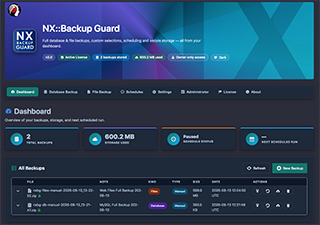
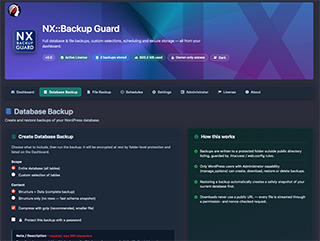
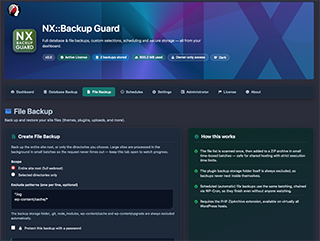
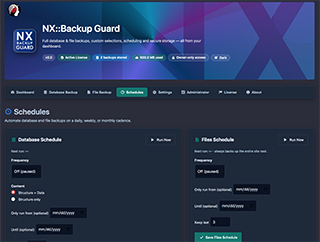
Detalles técnicos
Licencia y categoría
Categoría: Backup & Migration
Slug: nx-backup-guard
Versión 2.2
- Requiere WordPress 6.2+
- Probado hasta WordPress 7.1.2
- Requiere PHP 7.4+
- Actualizado: 27/09/2026
Aviso: New versions of NX::Backup Guard are available. Updating ensures better performance, security, and access to the latest features. Update Now.
Cómo instalar este plugin
Este plugin requiere licencia Basic — Licencia básica requerida y solo se instala a través de NX::WP Plugin Manager. Con una licencia Basic — Licencia básica requerida (o superior) activa en tu Manager, podrás instalarlo con un clic desde el propio panel de WordPress — sin necesidad de subir ningún ZIP manualmente.
Changelog — v2.2
v2.2 — NX::Backup Guard
- * Important: NX::Backup Guard now also requires NX::WP Plugin Manager's active license to cover this plugin's tier (Basic/Pro/Agency), not just the Manager being installed and active. Without a covering license, the plugin stays installed but fully inactive (no backups, no admin pages) and shows an explanatory notice; it resumes automatically once the license covers it. Existing installs relying on the Manager being merely active, without a matching license, will need an upgraded NX::WP Plugin Manager license after updating.
v2.1 — NX::Backup Guard
- * New: New function nxbg_manager_dependency_met() that calls nx_pm_is_manager_active().
- * New: If the Manager is not active: the plugin does not start any of its classes (NXBG_Core, menus, backup engine, scheduler, FTP, Administrator, updater, license — nothing), and instead only displays an error message in the admin explaining the dependency.
- * New: If the Manager is active: everything works exactly the same as before.
- * New: I do not forcibly deactivate the plugin — it remains "installed but inert", and as soon as the Manager is active again, it automatically resumes operation without the user having to reactivate anything.
v2.0 — NX::Backup Guard
- * New: Password-protected backup archives (AES-256, native ZIP encryption via PHP ZipArchive) — protects the sensitive content of backup files (including wp-config.php and the full database dump) if a backup ever leaves the server: manual download, remote FTP storage, or a hosting misconfiguration. Protected .zip files open normally in 7-Zip, WinRAR, and any WinZip-AES-compatible tool (the classic command-line `unzip` utility does NOT support AES-256 and cannot open them — use 7-Zip or a similar modern tool instead).
- * New: Manual Database Backup and File Backup — optional "Protect this backup with a password" checkbox. The password is used only for that single backup and is never stored anywhere; if forgotten, that specific backup cannot be recovered.
- * New: Settings → "Backup Password Protection" section — set a fixed password for Scheduled (WP-Cron) backups so unattended runs can protect themselves automatically and be restored with one click. The password is stored encrypted (same AUTH_KEY-derived pattern used for the FTP password) and shown once at set-time with a reminder to also keep an offline copy, since it cannot be recovered from this site alone if the site itself is lost.
- * New: password-protected backups are marked with a lock icon on the Dashboard, and the Restore modal now asks for the backup's own password (separate from the Plugin Administrator / WordPress account password already required to restore) whenever a protected backup is selected.
- * New: database dumps (.sql / .sql.gz) are wrapped into a single-entry encrypted .zip when a password is supplied, reusing the exact same AES-256 mechanism and Settings/UI as file backups.
- * Improved: encryption is applied before the remote-upload hook fires, so a protected backup never has an unprotected copy sent to FTP/remote storage.
- * Improved: graceful fallback — if the server's PHP ZipArchive build lacks AES encryption support, backups are still created (unprotected) and a clear warning is shown rather than failing silently or blocking the backup.
v1.9 — NX::Backup Guard
- * New: default remote FTP directory renamed from /backups/{domain}--{code} to /Backup-Guard/{domain}--{code} — clearer and less likely to collide with other software sharing the same FTP account.
- * New: "Delete the local backup copy after a successful FTP transfer" option on the Settings page (Remote Storage section) — applies only to manually created backups (Database Backup / File Backup pages). Backups created by a Schedule are never affected by this option and continue to be managed exclusively by the "Keep last N copies" retention on the Schedules page.
- * New: FTP upload verification — after every transfer, the remote file size is compared against the local one (via FTP SIZE) before the upload is considered successful; a partial or corrupted transfer is now treated as a failure and the local backup file is always kept in that case.
- * Improved: local backup deletion only ever runs after a verified successful transfer, and every deletion is recorded in the activity log for full traceability.
v1.8 — NX::Backup Guard
- * New: sidebar menu color theme (assets/css/admin-menu-theme.css + admin/class-theme-style.php), matching the visual pattern used across the NX:: plugin family.
- * Fixed: toggle switches (Settings page) were briefly showing WordPress core's own checkbox checkmark tick on top of the custom slider on every click — the native pseudo-element is now explicitly suppressed.
- * Verified: Django Updater integration (includes/class-updater.php + includes/class-license.php) — self-hosted update checks, plugin_information popup, and license registration/heartbeat pings all confirmed working against the NETSOLEX API.
v1.7 — NX::Backup Guard
- * Added: Dark Mode switch added to the Settings page (mirrors the header toggle).
- * Added: "Enable Plugin" master switch — disables every feature page and AJAX action except Settings, without deleting any data.
- * Added: "Delete tables on plugin deactivation" switch — when enabled, permanently removes all plugin data and local backup files on deactivation; disabled (default) preserves everything.
- * Added: "Show developer badge on frontend" switch — optional 32×32 badge, bottom-left, linking to netsolex.com/wordpress-plugins.
- * Added: default remote FTP directory is now /backups/{domain}--{permanent 12-character account code}, so multiple sites can safely share one FTP account.
- * Added: an .htaccess + index.php pair is now uploaded automatically into the remote FTP backups folder to block directory listing.
v1.6 — NX::Backup Guard
- * Added: standalone "Administrator" page with its own top-level menu, independent from the rest of the plugin — hosts the Plugin Administrator login, a live Active/Logout status, and a Recent Sessions log of the last 8 login attempts (date, IP address, browser, operating system, success/failed).
- * Added: full UI/UX redesign pass — consistent button shapes and sizes (the "Remove Protection" button is no longer an oversized pill, it now matches "Change Password"), every icon is vertically centered inside its button (including the Dashboard expand/collapse control), and a dedicated feature-by-feature About page with icons.
- * Added: Dark / Light mode, toggled from the header on every page, remembered per browser and matching the system preference by default.
- * Changed: the backup note/description field is now required (not optional) on Database Backup and File Backup, and is positioned directly above the "Run Backup Now" button so it can't be missed.
- * Changed: the Alternate Cron Trigger section on Schedules now explains, in plain language, what problem it solves, what the URL does, how to install it as a server cron job, and what "Regenerate URL / Token" does and when to use it.
v1.5.1 — NX::Backup Guard
- * Added: Every password field in the plugin (FTP, Plugin Administrator, restore confirmation, page-lock gate) now has a show/hide visibility toggle — unified into a single reusable pattern for all current and future password fields.
v1.5 — NX::Backup Guard
- * Added: Phase 5: full-site file restoration — restore a Files backup directly over live site files, batched so it never times out, with a progress bar and an optional automatic safety backup first.
- * Added: Plugin Administrator — a separate password (independent of any WordPress account) used to confirm restores, with a fallback to the current WP account password when not configured.
- * Added: Protected Pages — lock any combination of the plugin's admin pages (Dashboard, Database Backup, File Backup, Schedules, Settings, About) behind the Plugin Administrator password using simple on/off switches in Settings.
- * Fixed: the red "Cancel" button during backups now has proper white text on a solid rounded background instead of unreadable red-on-red.
v1.4 — NX::Backup Guard
- * Added: Phase 4: remote storage via FTP / FTPS. Configure host, credentials (encrypted at rest with AES-256), and a remote directory on the Settings page; test the connection before saving; optionally auto-upload every new backup (manual or scheduled, database or files); manually push any existing backup to the remote destination from the Dashboard. SSH/SFTP support is planned for a future update.
v1.3.1 — NX::Backup Guard
- * Fixed: the "Cancel" button on File Backup no longer stays visible after a backup reaches 100%. Success/error results across the plugin now show a clear colored badge (not just plain text).
v1.3 — NX::Backup Guard
- * Added: Descriptive notes (up to 200 characters) for every backup: optional note field on the Database Backup and File Backup pages, editable inline from the Dashboard, plus an expandable details row per backup for full metadata.
v1.2 — NX::Backup Guard
- * Added: Phase 3: independent Database / Files schedules (own frequency, time-of-day, weekday/day-of-month, date window, retention), self-realigning cron (no drift), email notifications on success/failure, capped activity log, "Run Now" buttons, and a token-protected alternate cron trigger URL for real server cron jobs.
v1.1 — NX::Backup Guard
- * Added: Phase 2: full site-root file backup and selected-directory backup, batched ZIP engine (no timeouts), live progress bar, directory picker, exclude patterns, scheduled file backups (chained WP-Cron), dashboard now distinguishes Database vs Files backups.
v1.0 — NX::Backup Guard
- * Added: Initial release — Phase 1: plugin structure and database backup engine.